 File RenamerRenames many files at once, with a preview and Revert
Why my own renamer?
Bulk Rename Utility is a great program for renaming many files at once – but it only exists for Windows. On the Mac I missed something like it. I wanted the same tool whichever computer I'm sitting at, so I built my own version that works on both Windows and macOS and can also be compiled for Linux.
File Renamer
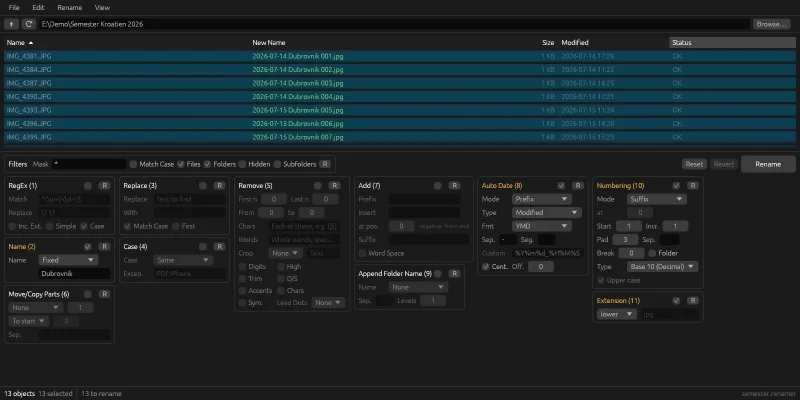
File Renamer is built after the model: a file list with the old and the new name side by side, and below it eleven panels of rules that run in order on every selected file. The preview recalculates as you type, so you see exactly what will happen before anything happens.
The image at the top shows a typical case: twelve holiday photos from the camera, IMG_4381.JPG onwards, become 2026-07-14 Dubrovnik 001.jpg. Four panels do the work – a fixed name, the date the file was modified as a prefix, a running number as a suffix, and the extension in lower case.
The panels are the same as in the model:
- RegEx with
\1references, or simple wildcards - Name, Replace and Case, with exception words like
PDFandiPhone - Remove: the first or last characters, a range, words, digits, accents, double spaces and more
- Move/Copy Parts and Add: move parts of the name, add a prefix, a suffix or text at a position
- Auto Date: created, modified, now or the photo's EXIF date, with a time offset for a camera set to the wrong time zone
- Append Folder Name, Numbering (also binary, hexadecimal, letters and Roman numerals) and Extension
Sets of rules are saved as .renamer files in TOML, which can be read and edited by hand.
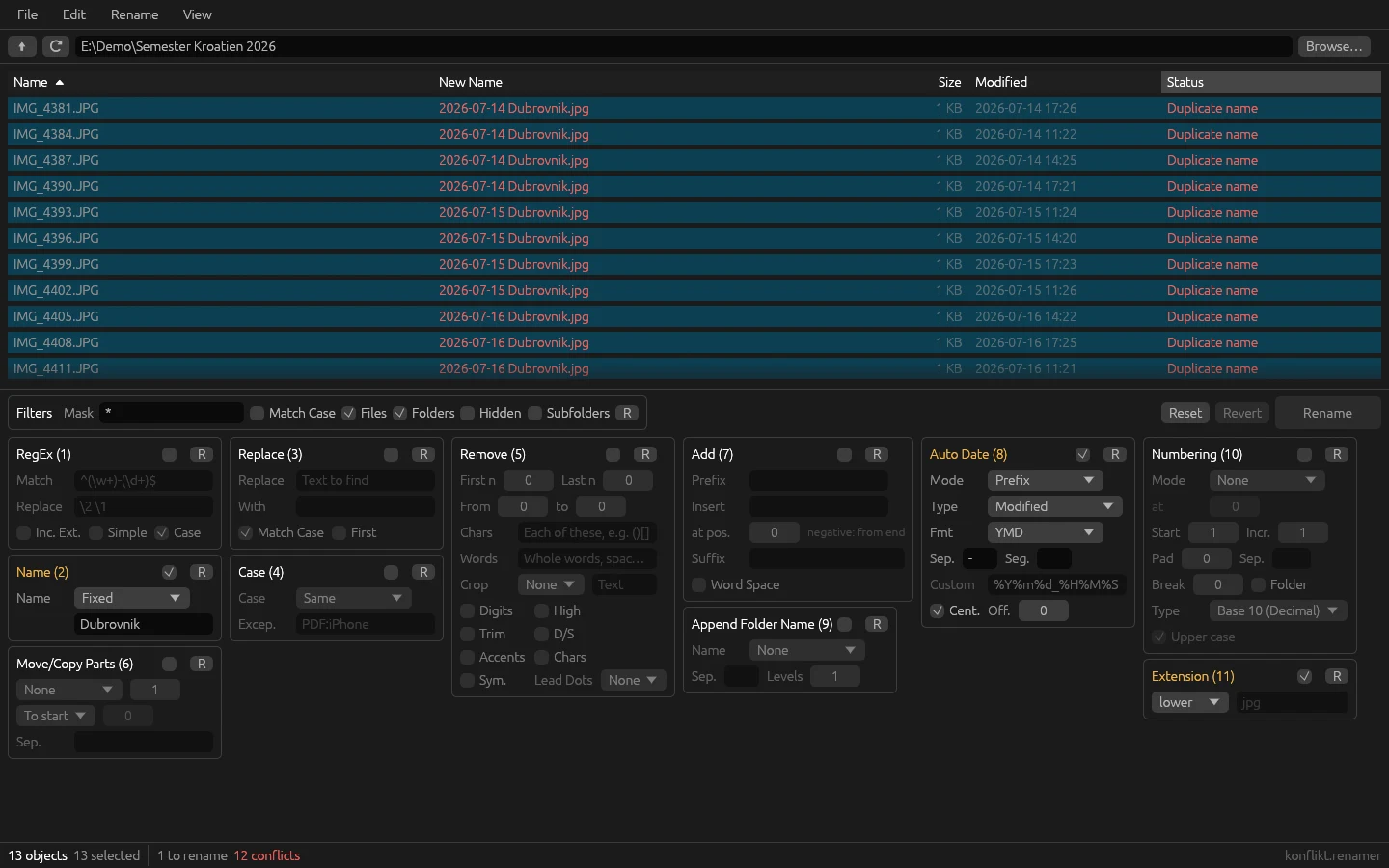
The most important part, though, is safety. No rename runs if any selected row has an error: two files that would get the same name, a name that already exists on disk, or a name that can't be used on Windows – <>:"/\|?*, reserved names like CON and NUL, a trailing dot. Windows rules apply on the Mac too, because the files may end up on a Windows drive or a USB stick. Renaming happens in two steps via temporary names, and if something goes wrong halfway, everything is rolled back. Every batch is saved in a log, so Revert undoes the latest rename – even after a restart.
The program is built with Claude Code, in Rust with egui, and the icon was made with Codex. The rules live in a library with no interface and 75 tests. The work was run from an issue board, as in my other projects: Claude Code went through Bulk Rename Utility and split the build into issues – the rules, safety, the interface, rule files – and tried renaming against real files before an issue was closed.
Along the way
Characters, not bytes. "Remove the first three characters" should take Års off Årsmöte. In UTF-8, å takes two bytes, so a position counted in bytes would cut in the middle of a letter. Every position in the rules is therefore counted in characters.
A case-only rename is a rename to itself. photo.jpg → Photo.jpg looks like a conflict on NTFS and APFS, which don't distinguish case: the target "already exists", because it's the file itself. The same goes for two files swapping names. The solution is renaming in two steps – first to a temporary name, then to the new one.
macOS overwrites without asking. The file system's rename on macOS silently replaces a file that already exists. If a new file has appeared under the new name since the preview, it would vanish. So renaming never overwrites a file that appeared in the meantime, and a test holds it to that.
A half-typed date format could bring the program down. Auto Date takes a custom format, like %Y%m%d. The date library panics on an unknown % code – and the format is typed while the preview runs, so even a half-typed code would have been enough. An unknown format is therefore shown as written instead of being calculated.
Revert mustn't do harm. Undoing a rename after a restart is only safe if nothing has happened to the files since. So Revert first checks that every file is still there under its new name and that no other file has taken its old one, and refuses otherwise.
Compared with Bulk Rename Utility
Bulk Rename Utility is the model and surely better in several areas. It has more panels – advanced filters, copying to another location, changing attributes and timestamps, and scripting – that I deliberately left out.
What mattered most to me was having the same tool on both Windows and macOS:
- the same panels and the same rule files on both computers
- the same safety checks on both, with Windows naming rules on the Mac too
Try it yourself
Under Files you'll find IDEA.md: a complete description of the program and everything I learned during the build, written as a brief. Give it in full to Claude Code and you have the groundwork for a renamer of your own – the panels, the safety rules, the pitfalls above written as rules, and a ready-made prompt to start from.