 Service Bus ExplorerFast explorer for Azure Service Bus with a focus on dead letters
Why my own Service Bus explorer?
There's no good alternative for macOS, so I wanted something that works well. Azure's web-based Service Bus Explorer in the portal is far too slow and needs lots of extra clicks every time.
Service Bus Explorer
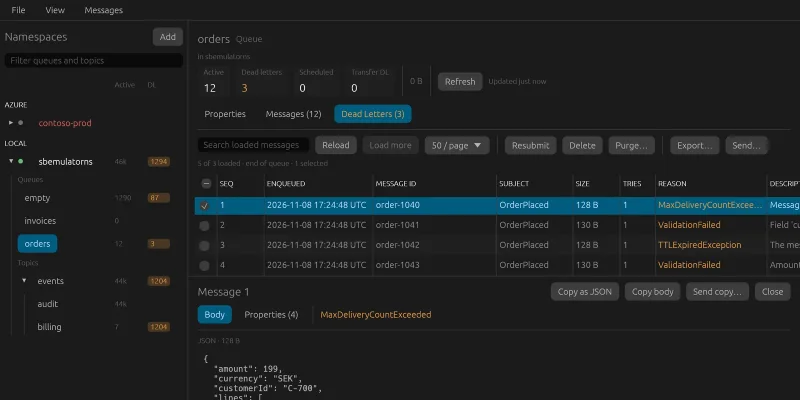
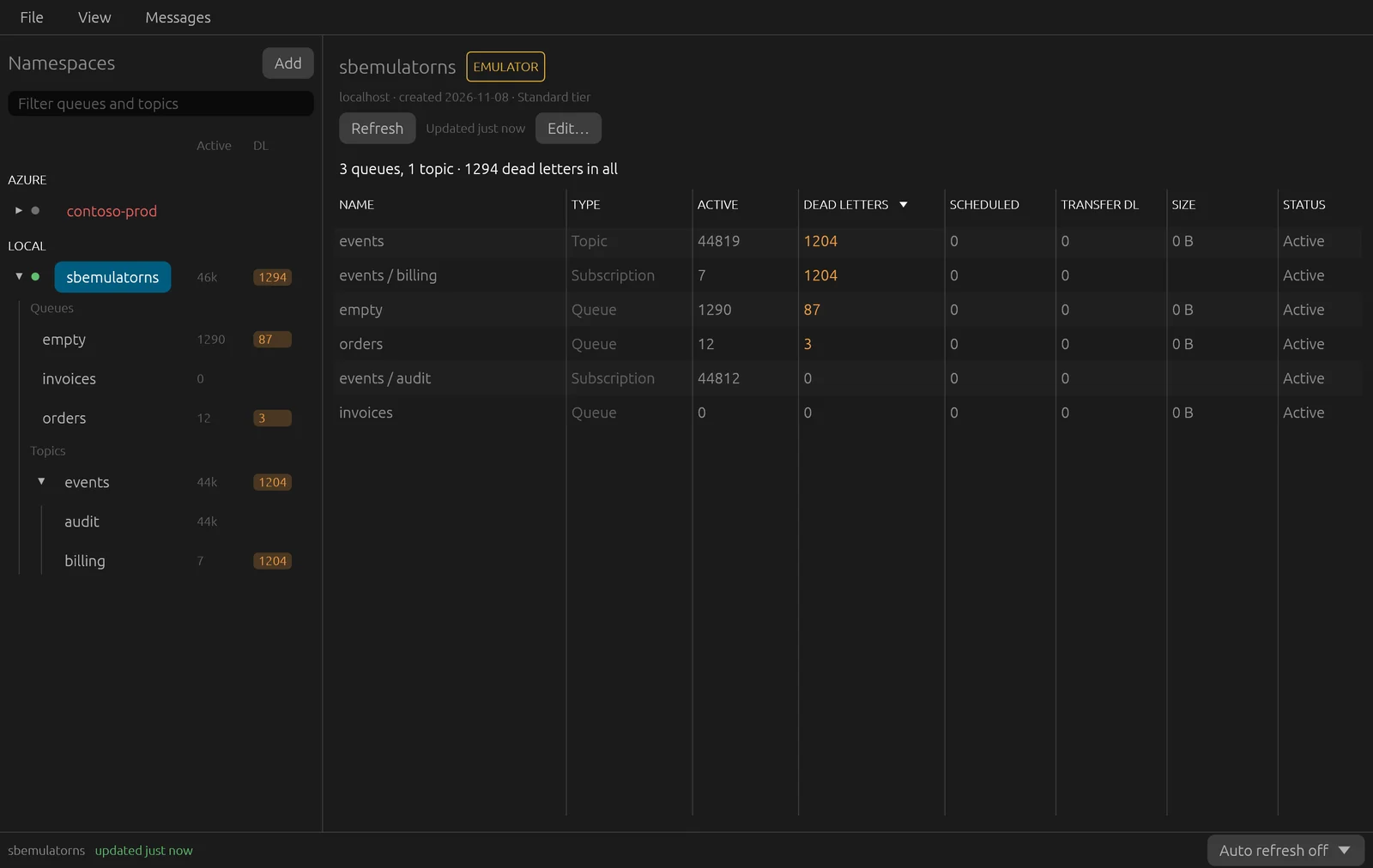
Service Bus Explorer shows the queues, topics and subscriptions in Azure Service Bus in a tree, with the number of active messages and dead letters right on every row. Dead letters show in a warning colour, and a topic sums up its subscriptions. Several namespaces are saved locally and grouped, for example into Prod and Test. You sign in with a connection string or with Entra ID through az login.
What the app does:
- an overview per namespace, sorted with the most dead letters first, and automatic refresh
- the configuration of every queue, topic and subscription, and the subscriptions' rules (SQL and correlation filters)
- browse messages and dead letters page by page, with search. The body is formatted as JSON or XML, and every property is shown with its type
- resubmit or delete selected dead letters, purge a queue, send new messages and export to JSON
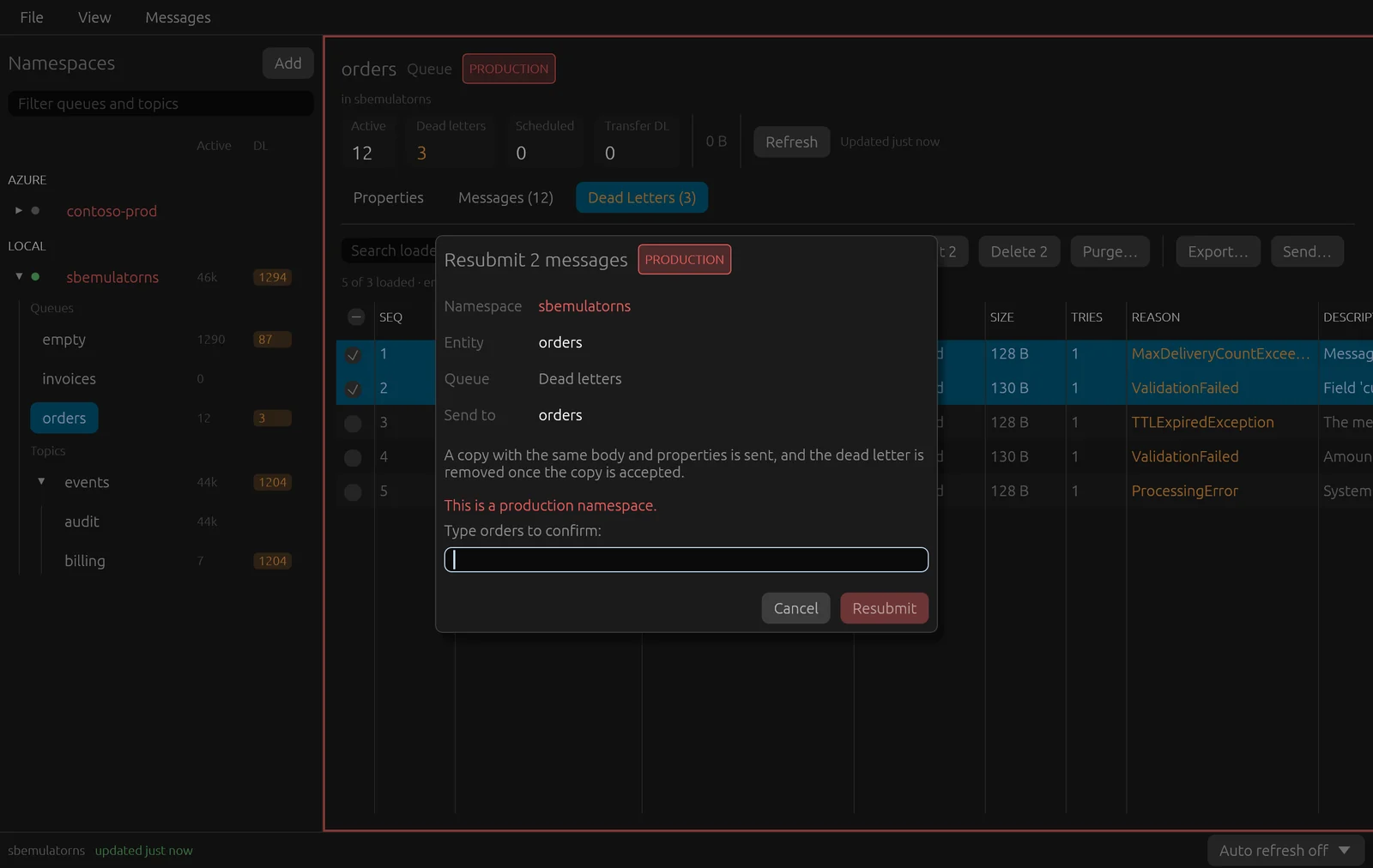
- extra care in production, and a read-only mode that turns off everything that changes anything
Looking changes nothing. The app uses true peek, which reads the messages without locking them and without their delivery count going up. That sounds obvious, but there are similar tools that lock and release the message to show it, and then every look counts as an attempt.
Everything that changes something is confirmed. In a namespace marked as production, the workspace gets a red frame, and you have to type the queue's name before the button can be pressed. Resubmitting or purging many messages runs in the background, with progress and the option to cancel.
The program is built with Claude Code, in Rust with egui, for Windows and macOS, and the icon was made with Codex. Networking runs on its own thread, never in the interface. The tests run against Microsoft's Service Bus emulator in Docker, and everything that deletes or resubmits is tried only there – never against a real namespace. All the images in this post were taken against the emulator.
The work was run from an issue board, as in my other projects. Claude Code started with research on similar programs – Paolo Salvatori's Service Bus Explorer, the portal's, and tools in .NET, Electron and Rust – and on what their users complain about. Most of what's described above comes from that.
Along the way
Resubmitting without breaking things. The model's issue tracker has reports of messages that changed when they were resubmitted: lost fields, extra quotes and new line endings. Here the body is treated as untouched bytes, and the properties keep their types. Only what Service Bus itself added, and the reason the message became a dead letter, is removed.
Only the first dead letter showed. A subscription had five dead letters, but only one was shown, and Load more was disabled. Service Bus doesn't always fill a page, even when there are more messages, and the app took a half-full page to mean the end. In a partitioned topic the messages also don't come in number order, so the next page has to start after the last message in the response – not after the highest number.
Unreadable times. A time that a .NET program put in a message was shown as Described(… com.microsoft:datetime-offset …, Long(639281619336876125)) – the number of ticks since year 1. Now it's shown as a time, and the same goes for time spans and addresses.
The emulator doesn't count. Microsoft's emulator answers almost everything, but gives no counts. So that the numbers in the tree and the overview could still be reviewed, the tests fill in made-up counts, and the counting is tested against a response in the same shape as Azure's.
An app from Finder can't find az. An app started from Finder or the Dock doesn't get the terminal's search path, so signing in with Entra ID couldn't find the Azure CLI. The app now looks in known places itself.
Compared with the portal and Salvatori's program
The Azure portal's Service Bus Explorer is always at hand but is slow, needs many clicks and shows at most a hundred messages at a time. Paolo Salvatori's Service Bus Explorer can do everything and is the model, but is only available for Windows.
What Service Bus Explorer gives me:
- the same program on Windows and macOS
- the counts and dead letters right in the tree, without extra clicks
- peek that changes nothing
- extra care in production, and a read-only mode
Try it yourself
Under Files you'll find IDEA.md: a complete description of the program and everything I learned during the build, written as a brief. Give it in full to Claude Code and you have the groundwork for a Service Bus explorer of your own – the stack, the decisions that turned out to matter, the pitfalls above written as rules, and a ready-made prompt to start from.