 Kube ExplorerSimple Kubernetes explorer with logs, port-forward and production safeguards
Why my own Kubernetes explorer?
Most of what I do in our Kubernetes clusters is the same few things: see which pods are running, follow the logs for an app, open a port-forward to a service and now and then restart or scale a deployment. It can all be done with kubectl, but I wanted something simple and tailored to use instead of the usual commands.
Lens is the model, and it works well. But it can feel cluttered, with loads of features I use very rarely, if ever.
Kube Explorer
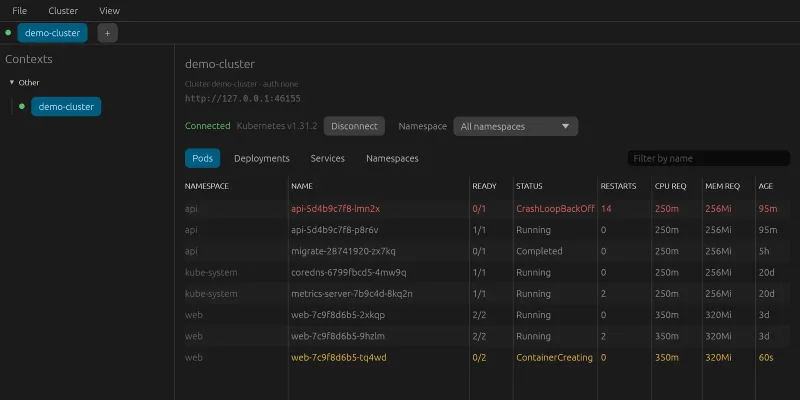
Kube Explorer reads the clusters from kubeconfig and signs in with the same plugins kubectl uses, for example kubelogin for Azure. The lists of pods, deployments, services and namespaces are live – a pod that's restarted is replaced in the list within a few seconds, without anything having to be done. A crashing pod shows in red, a starting one in yellow.
What the app does:
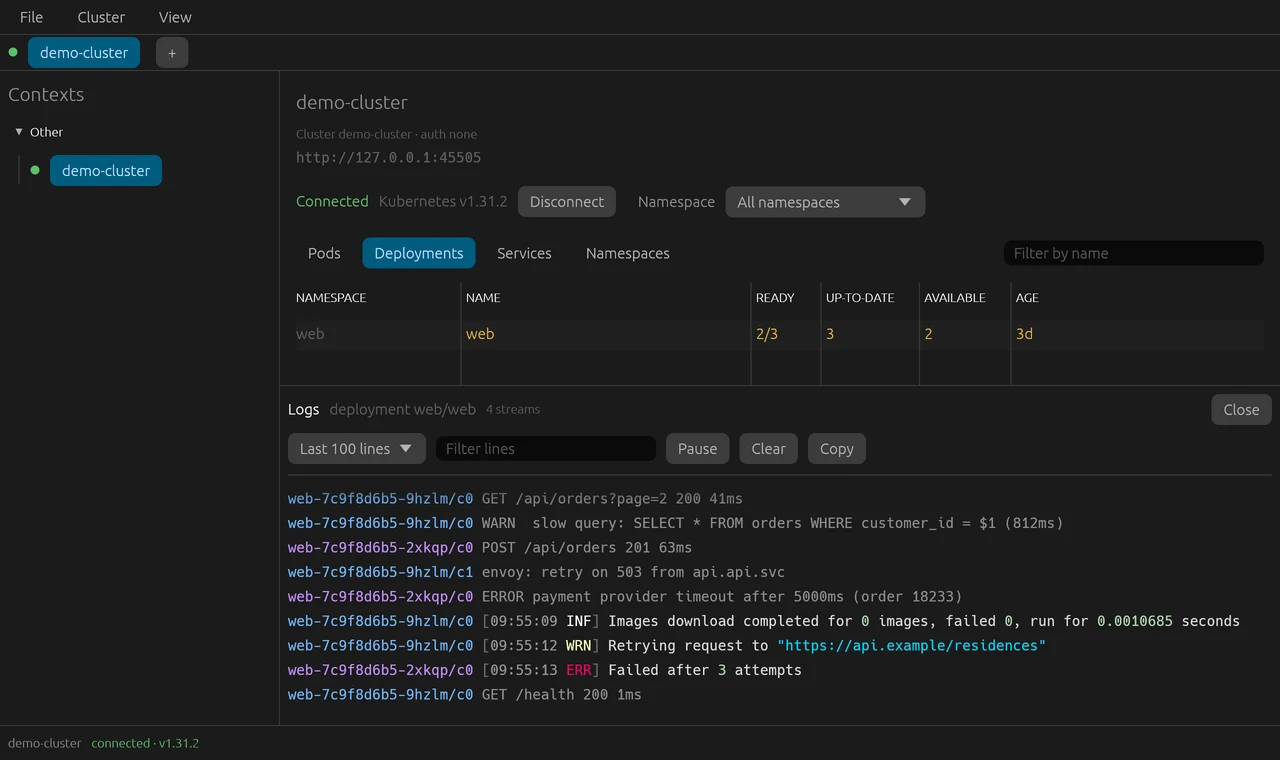
- logs for a whole app: every pod in a deployment or service in one stream, one colour per pod, with colour codes from the logs and the option to pause, filter and copy
- port-forward to a service, which picks a pod that's ready and switches to a new one when the pod is replaced
- YAML and Describe for the selected item, in a panel on the right
- restart and scale a deployment, with confirmation
- tabs for several clusters in the same window, favourite namespaces and sorting per column
- on Windows, the clusters in the kubeconfig in WSL are read too
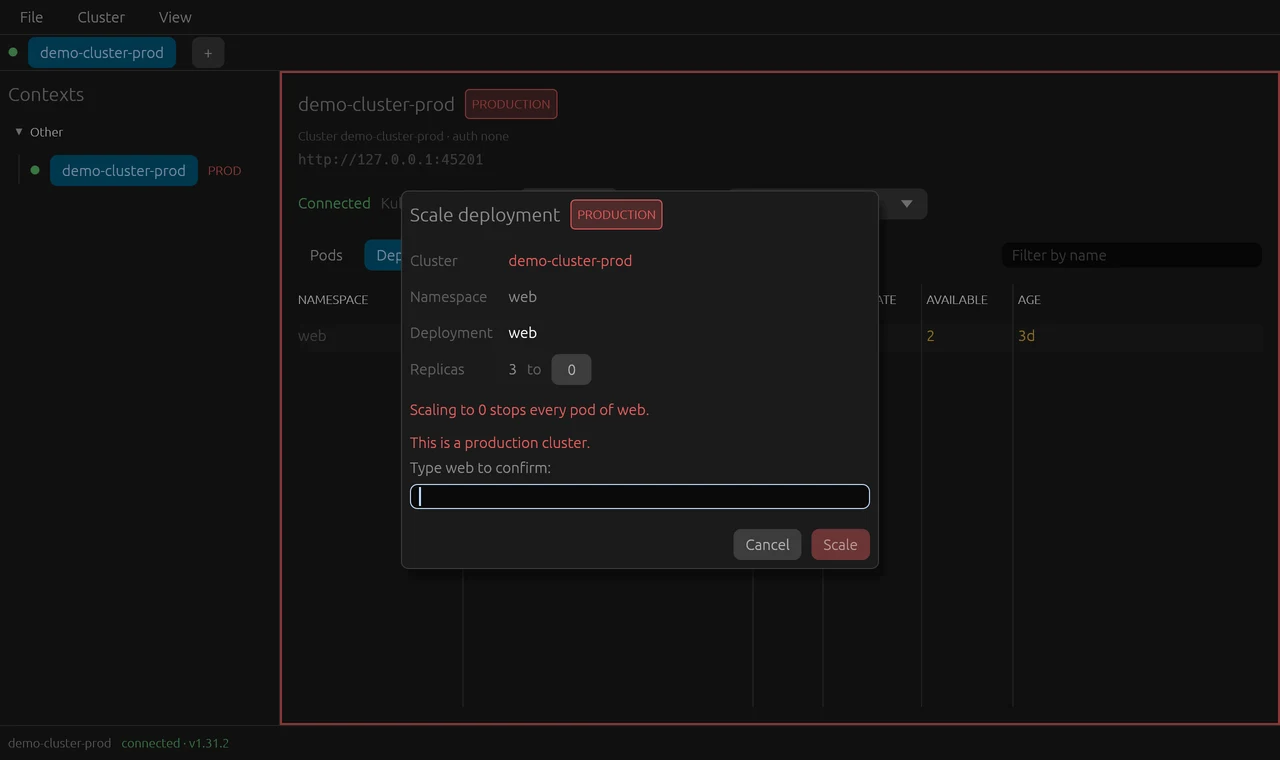
Everything that changes something in the cluster – restarting and scaling – is always confirmed. In a production cluster the app is extra careful: the cluster gets a red frame, and you have to type the deployment's name before the button can be pressed. Scaling to 0 in production gets its own warning.
The program is built with Claude Code, in Rust with egui and kube-rs, for Windows and macOS, and the icon was made with Codex. Networking runs on its own thread, never in the interface. The tests run against a made-up API server that answers like a real cluster – lists that change while you watch, logs being followed and port-forward over WebSocket – so everything except the sign-in itself can be tried without a real cluster. All the images in this post were taken against it.
The work was run from an issue board, as in my other projects. Claude Code started with research on similar programs – Lens, Freelens, Headlamp, Aptakube and k9s – and split the build into issues. How careful the app should be in production was a decision of its own that I had to make before anything was built.
Along the way
The sign-in code never showed. When signing in to Azure, kubelogin writes a code to enter in the browser. The kube-rs library reads what kubelogin writes only when the process is done – so the code never appeared while anyone could use it. Now the app runs kubelogin itself before connecting, reads the lines as they come and shows the code in a box with Copy Code and Open Browser. Then kube-rs connects with the saved sign-in.
An app from Finder can't find kubelogin. An app started from Finder, the Dock or the Start menu doesn't get the same search path as the terminal. So the app reads the terminal's path once at startup, looks in known places and lets you point to the program if it still isn't found.
Open Browser did nothing. The button for opening the sign-in page – and Open on a port-forward – was dead. A feature for opening links was switched off in the interface library, which only logged a warning. Now it's included, and a test clicks the button.
Arrows became empty boxes. Characters like → aren't in the font that ships with the interface library and were drawn as empty boxes. The interface writes words instead.
A restart isn't the same restart. kube-rs's built-in restart sets a different marker than kubectl rollout restart. The app sets the same marker as kubectl, so a restart behaves the same whichever tool made it.
Compared with Lens
Lens is the model and works well, and it can do much more: more resource types, extensions, metrics and integration with the cloud providers. That's also what makes it cluttered for me.
What Kube Explorer gives me:
- just what I actually do, without everything around it
- extra care in production clusters
- logs for a whole app and a port-forward that copes with the pod being replaced
- no account and no sign-in to anything but the cluster
Try it yourself
Under Files you'll find IDEA.md: a complete description of the program and everything I learned during the build, written as a brief. Give it in full to Claude Code and you have the groundwork for a Kubernetes explorer of your own – the stack, the decisions that turned out to matter, the pitfalls above written as rules, and a ready-made prompt to start from.