 SVNerGraphical Subversion client for macOS with every working copy in one window
Why another SVN client?
I use Subversion, but not every day. When I do, I want to see what has changed, read a diff and commit without having to remember the commands.
The choice of free graphical clients for macOS is poor. Most of the ones that exist have high licence costs and charge on a recurring basis, and for something I use now and then that was not justifiable. Paying once would have been more reasonable than paying every month.
There was one more thing I missed: having all my projects in the same window, instead of one window per project.
SVNer
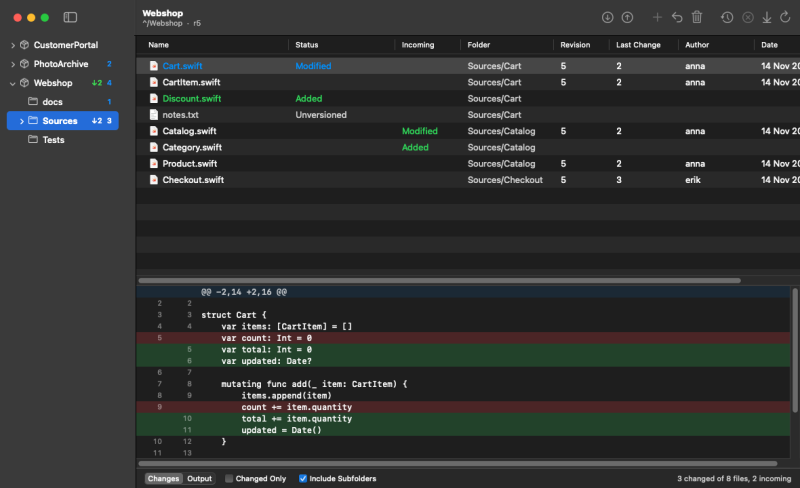
SVNer is a native Mac app modelled on SmartSVN. Every working copy sits in the sidebar on the left, each with its directory tree and the number of changes. On the right are the files in the selected folder with state, revision, author and date, and below the table the changes in the selected file.
This is what it can do:
- show status, locally and what is waiting on the server
- show the diff for a file
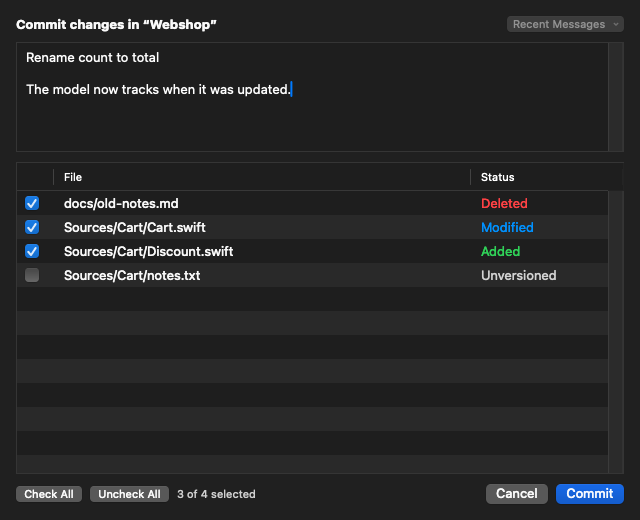
- commit a selection with checkboxes and a message
- update, add, revert, delete and rename
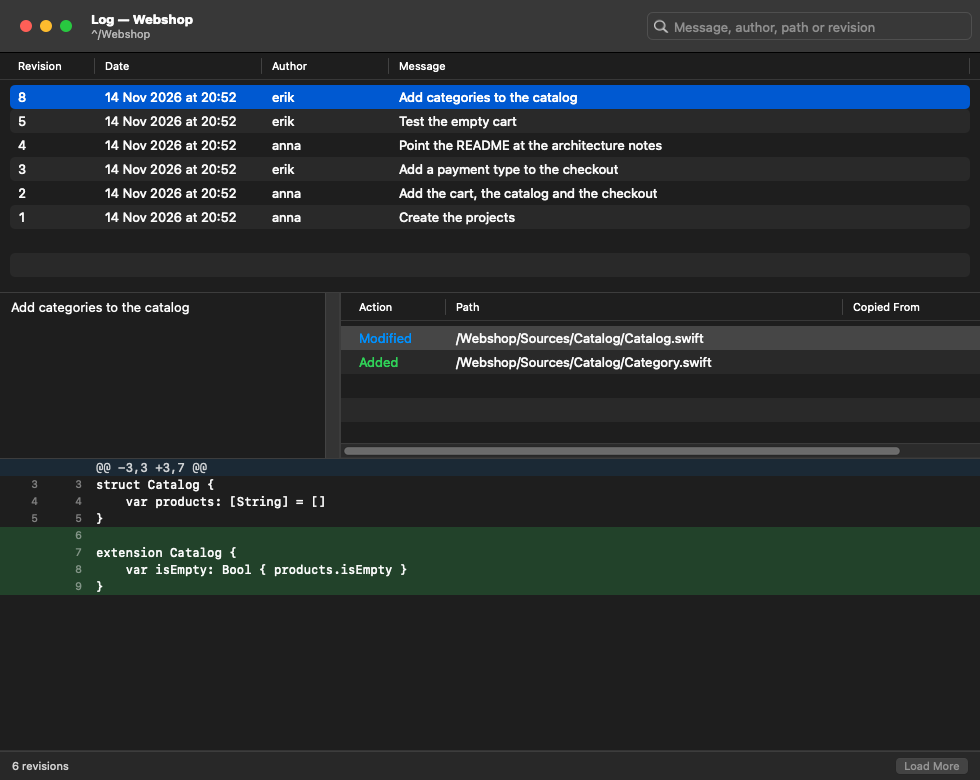
- show the log, with search and a diff per revision
- browse a repository, create a folder there and check out
- resolve conflicts, in a three-way editor too
The window refreshes by itself when files change on disk. The screenshots here show demo data, not my own projects.
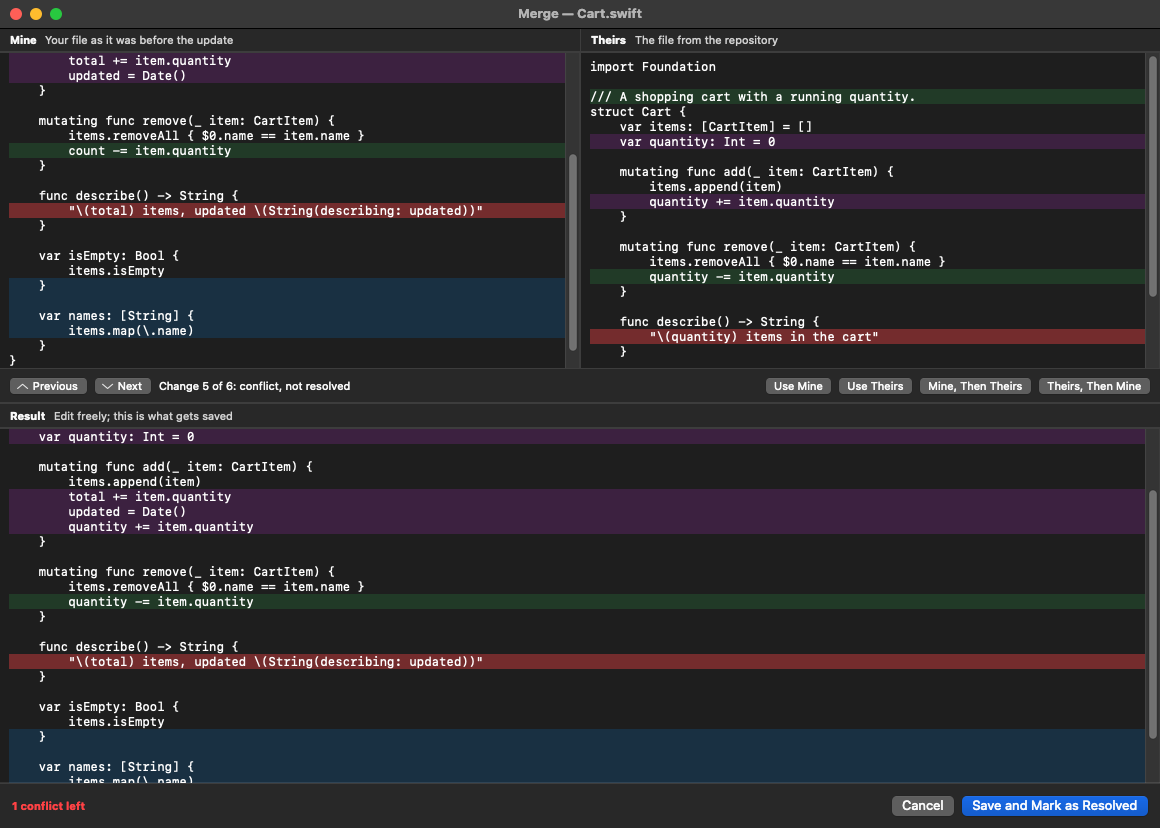
When an update collides with my own changes, the file opens in a three-way editor: my version and theirs at the top, the result below. What changed on one side only is already merged. For each chunk that conflicts I choose my side, theirs or both, and the result can be edited freely before it is saved.
Everything is built with Claude Code, the icon included. I asked for a plan first, with the question of whether the app should be written in Rust or Swift. The answer was Swift with AppKit: an SVN client is almost nothing but trees, tables, split views and menus, and AppKit has those ready. Rust's advantage is several platforms, and the app is only meant for macOS.
The other big choice was the engine. SVNer does not link Subversion's libraries; it runs the svn command with --xml and parses the answer. That means one process per command, and the question was whether that is good enough. Claude measured it: reading status takes 0.17 seconds for a working copy with 91 entries and 1.49 seconds for one with 15,149.
The work went one ticket at a time in my issue tracker Relay: status first, then diff, commit, commands, log and so on. Each ticket was closed with what had been measured and what could not be tried. The code is about 8,400 lines of Swift, and the finished dmg is 2.5 MB.
Two things let Claude work on its own. The tests create their own repositories with svnadmin create and run real svn commands against them, so nothing of mine was touched. And the app can take a picture of its own window and quit, so Claude could see the interface it had just built.
Along the way
The at sign in file names. Subversion reads @ in a path as the start of a revision, so you append an extra @ at the end. That turned out not to hold everywhere. svn diff reads no @ at all, and neither the destination of svn move nor the destination folder of svn checkout does: there the extra character ended up in the file name. In URLs not even percent-encoding helped. Four different bugs, all found by tests with @ in the name and none of them in the documentation.
Non-ASCII characters. An app started from Finder has no language setting in its environment, and svn then refuses paths with characters outside ASCII. Every run now gets an explicit UTF-8 setting.
File or folder? svn status --xml does not say what an entry is. The app asks the disk, and for what is no longer there an entry counts as a folder if something else lies below it.
Feedback loop. Even svn status writes to the .svn folder. When the app started refreshing on file changes, every refresh could have triggered the next. Changes that only touch .svn shortly after the app's own read are therefore treated as an echo.
One window per project. The first version opened every working copy in a window of its own, like the model. That was exactly what I wanted to get away from, so the control code had to be rewritten: one window that owns the sidebar and the toolbar, and one part per working copy.
Login. The app cannot yet ask for a password or accept a certificate. Against my server it works without problems because svn already has the details stored, but a new server needs a round in the terminal first.
Compared with the alternatives
SmartSVN does a lot more: revision graph, annotate, merge, branches and tags, and change sets. It also has its own implementation of Subversion, while SVNer needs svn installed, with Homebrew for example. Someone who works in svn all day has use for all of that.
What SVNer has is what I was missing myself: no recurring cost, every working copy in one window, and an app that behaves like a Mac app because it is built with the system's own controls. For someone who uses svn now and then, that goes a long way.
Try it yourself
There is no finished app to download. Instead I am attaching IDEA.md: the whole specification, with the decisions, the pitfalls, the measurements and a ready-made prompt. Give it to Claude Code and you can build your own.